
Fight Mode is the core combat loop of Idle Outpost where your survivor takes up arms against relentless waves of the undead to secure survival assets. This mode functions as an endless idle loop, meaning your character continuously battles enemies and scavenges resources even while you are managing your main Trade outposts. Pushing through this mode is the absolute primary method for acquiring high-tier Military Gear, gaining player experience, and gathering specialized Brave Coins to enhance your tools.
- Accessing the Mode: Tap the Fight button located on your main game screen.
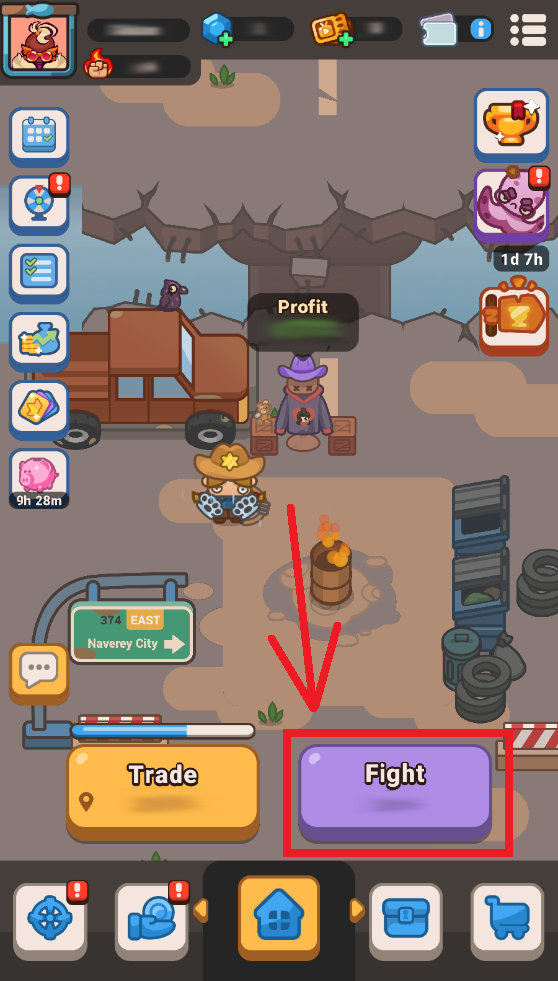
How to Navigate Fight Mode
Progressing through the endless horde and managing your battlefield loot involves a few central mechanics:
- Automated Stages and Boss Challenges
1. The Idle Loop: Your character automatically advances through linear waves of zombies. Each small stage victory awards Brave Coins.
2. Boss Fights: At the end of every stage, you will encounter a powerful Zombie Boss.
3. The Manual Override: You can immediately force your survivor to challenge the active boss by tapping the prominent Challenge button at the bottom of your screen.
4. Getting Stuck: If an enemy boss proves too powerful, your survivor will safely fall back to the current stage loop, continuously fighting same-level zombies to gather background experience and coins until your stats are upgraded enough to try again.
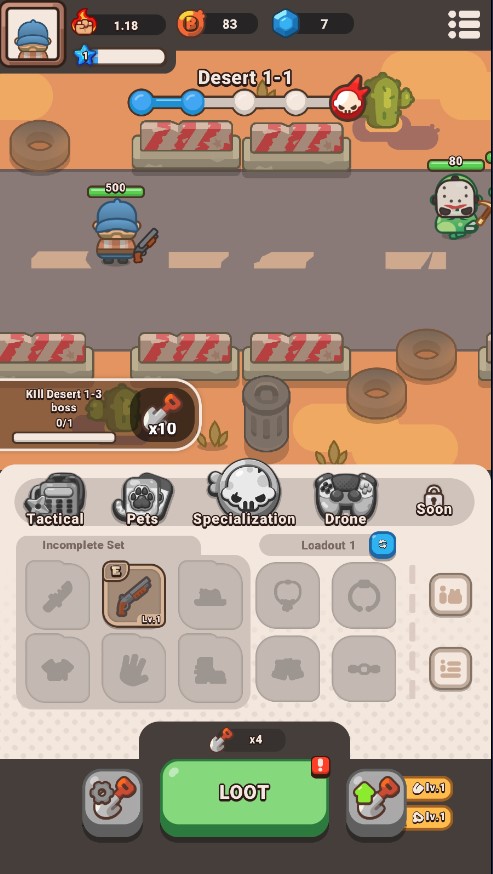
- Looting System
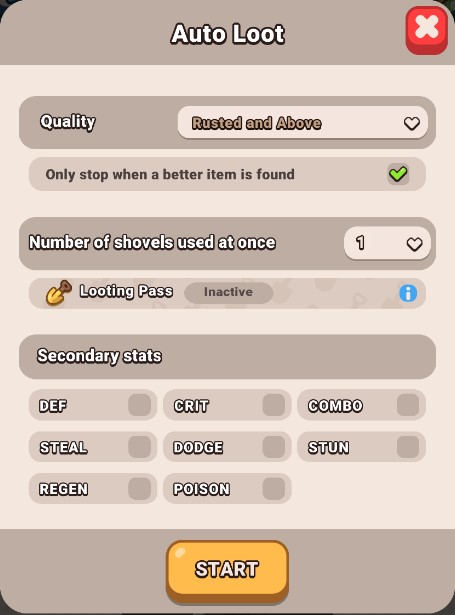
As your character fights, you will accumulate Shovels to dig up Military Gear via the Loot button. To prevent inventory micromanagement, you can engage the Auto Loot system and toggle four precise optimization criteria:
1. Quality: Configure the system to only alert you or stop the loop when a piece of gear matches your desired rarity threshold (e.g., Rare, Epic) or higher.
2. Number of Shovels: Set this to expend multiple Shovels simultaneously. This heavily accelerates your digging speed without missing a single gear.
3. Looting Pass: Activate this option to unlock maximum automated extraction efficiency and the fastest operational looting speeds available.
5. Secondary Stats: Target exact attributes! The system will filter out unwanted equipment and only halt or alert you if an item drops with the specific bonus modifiers you have custom-selected.
Pro-Tips for Dominating the Hordes
- Prioritize Your Shovel Upgrades: Never let your Brave Coins sit idle! Routinely invest your coins into upgrading your Shovel Blade and Shovel Handle. Upgrading your Shovel is the single most important mechanic required to permanently unlock higher gear rarity drop brackets.
- Discarded Gear is Lost Forever: When your storage vault fills up, and you find a superior weapon or armor piece, you can swap it onto your character immediately. However, evaluate your items carefully—any gear pieces you choose to discard or replace to clear up inventory clutter are permanently destroyed and cannot be recovered.
- Synergize Your Advanced Unlocks: Raw weapon damage will only carry you so far. As you clear later stages, make sure to continuously level up your supporting combat features found inside your inventory sub-tabs:
- Tactical Gear: Collect tickets to pull powerful items with different skills.
- Pets: Deploy companion animals to fight alongside you.
- Drone: Use gearwheels to build supportive aerial tech.
- Specialization: Invest Class Dice to shape your survivor's custom combat class.
Frequently Asked Questions (FAQ)
Q: Why does the boss victory not count? The battle restarts when I defeated it / when they are at low HP.
A: Even if it looks like you’ve defeated the boss, if the unseen combat timer expires at that exact same moment, the game registers the sequence as a failure to clear the stage in time and resets your progress back to the beginning of the idle loop. To break this loop, you typically need to defeat the boss just a little bit earlier. We highly recommend focusing on increasing your overall power or adjusting your gear layout for a higher damage output.
Q: What is the difference between Military Gear and Trade Gear?
A: Military Gear is exclusively farmed via Shovels in Fight Mode and directly increases your health, attack power, and combat stats. Trade Gear is found via Trade Chests and improves your Trade outpost profits.
Q: Are there offline rewards for Fight Mode?
A: Yes! While you are away, your character will continue to fight waves and farm background items and Brave Coins for up to 8 hours.