
You can easily move your game data to a new device using cloud saving, provided you are staying within the same ecosystem (iOS to iOS, or Android to Android).
⚠️ Critical Warning: You must link the game on your OLD device first. If you link the new device first, a blank level-1 profile will overwrite your cloud save, and it may be impossible to recover your progress!
Step 1: Secure Your Save on the OLD Device
Open the game on your old device and tap the gear icon to open Settings.
At the very bottom of the window, right below the social media buttons, look for your Player ID. Tap it once to copy it automatically. Save this number somewhere safe, just in case!
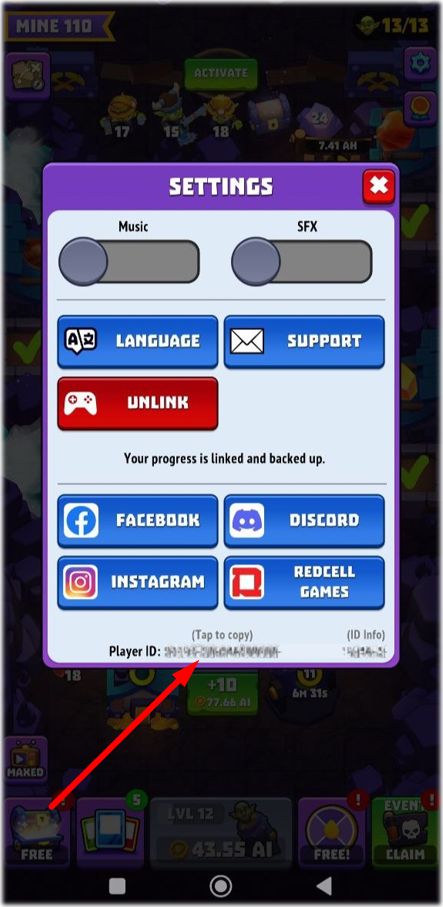
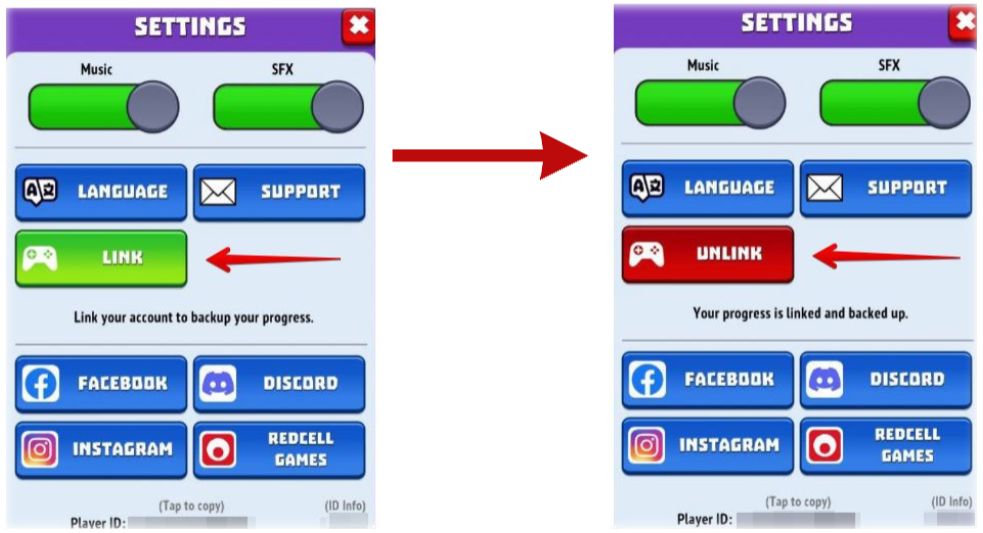
Tap the Link button and connect the game to your Apple ID or Google Play account.
Verify: Once successfully connected, the button text will change to Unlink. This means your progress is safely in the cloud.
Note: Do not uninstall the game from your old device until the entire transfer is complete.
Step 2: Load Your Save on the NEW Device
Download and open the game on your new device.
Complete the short tutorial, then tap the gear icon to open Settings.
Tap Link and log in to the exact same Apple ID or Google Play account you used on your old device.
The game will automatically detect your cloud save and load your progress.
Troubleshooting: What to Do if Progress Doesn't Load
If your progress does not appear automatically, don't panic! Our team can transfer it manually.
Contact us via the Support button inside the new device's Settings menu and provide:
Your Old Player ID (the account you want to recover).
Your New Player ID (the blank account on your new device).
🔗 Moving between iOS and Android? Automatic cloud linking does not work across different operating systems. If you are switching platforms, please follow our specific guide: How to Transfer Progress Between iOS and Android.
⛔ Important Reminder: We do not support playing on multiple devices simultaneously. Once your progress is on the new device, please stop playing on the old one to avoid data corruption or progress loss.