
Orders are usually delivered instantly, but occasional store processing delays can happen. Please do not try purchasing the item again — it should arrive in your account shortly!
Before contacting support, please try the following quick troubleshooting steps:
Restart the game: Completely close the app from your device's background processes and reopen it to refresh the server connection.
⚠️ Important: Do not uninstall or remove the game from your device, or you risk losing your local game progress!
Wait up to 2 hours: Give the payment gateway some time to finalize the transaction.
How to Contact Support for Assistance
If your items have not arrived after 2 hours, our team will gladly check the status of your purchase. Please reach out to us directly through the game:
Tap the gear icon on the main screen to open the Settings menu.
Tap the Support button.
To help us resolve your issue quickly, please provide the following details in your message:
A brief description of the item or currency you purchased.
Your official receipt.
Where to Find Your Receipt
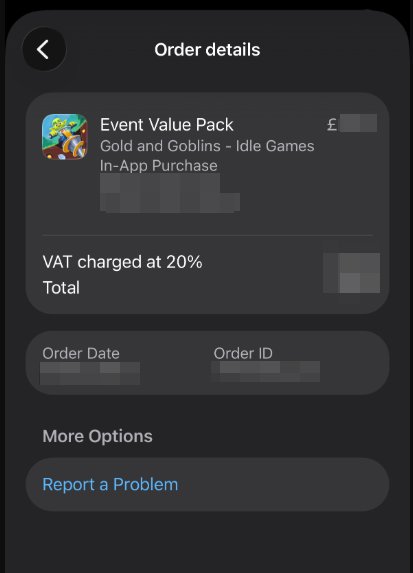
For iOS Devices: Please send us a screenshot of your official Apple purchase receipt. You can locate this by checking your Apple ID / iTunes Purchase History.
For Android Devices: Please provide your Google Play order number. Google IDs always start with GPA followed by a series of numbers (e.g., GPA.XXXX-XXXX-XXXX-XXXXX).
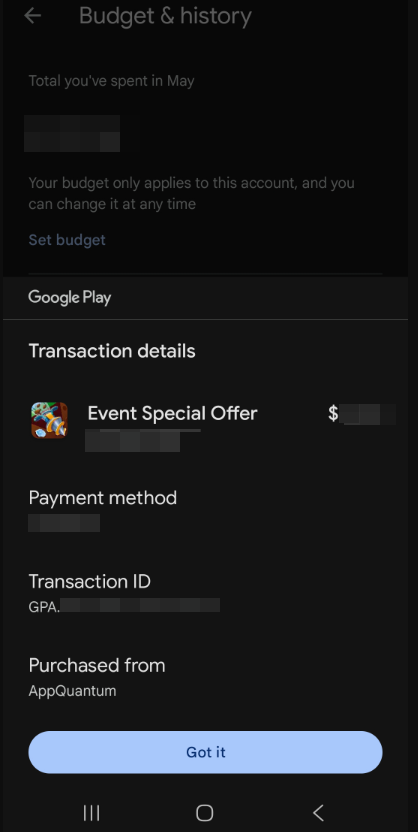
🔗 You can find your GPA number by logging into the account you used for the purchase on the Google Pay Activity Page. Tap on the specific payment to open its details and copy the ID.