
Feature Overview
If your factory vehicles suddenly stop moving and production grinds to a halt, you are likely experiencing a stuck order. This situation occurs when there is a mismatch between the delivery contract you accepted and the materials currently available in your warehouse storage. It is completely normal and can be quickly resolved with a simple manual adjustment.
How to Access
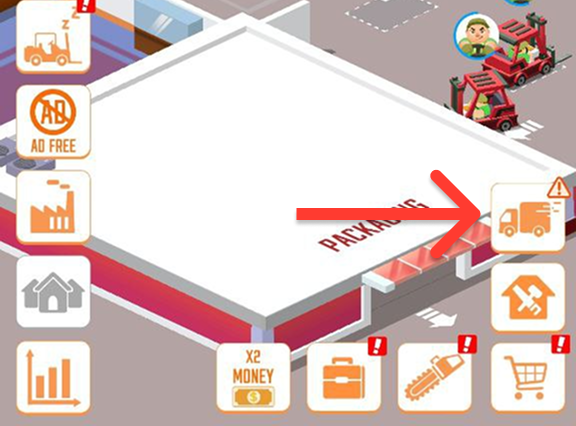
You can manage, review, and clear out these issues by opening your Order Board menu from the main sawmill interface.
Core Mechanics
The sawmill's automation system relies on your forklifts delivering the exact resources requested by your current client. A bottleneck occurs due to the following pipeline logic:
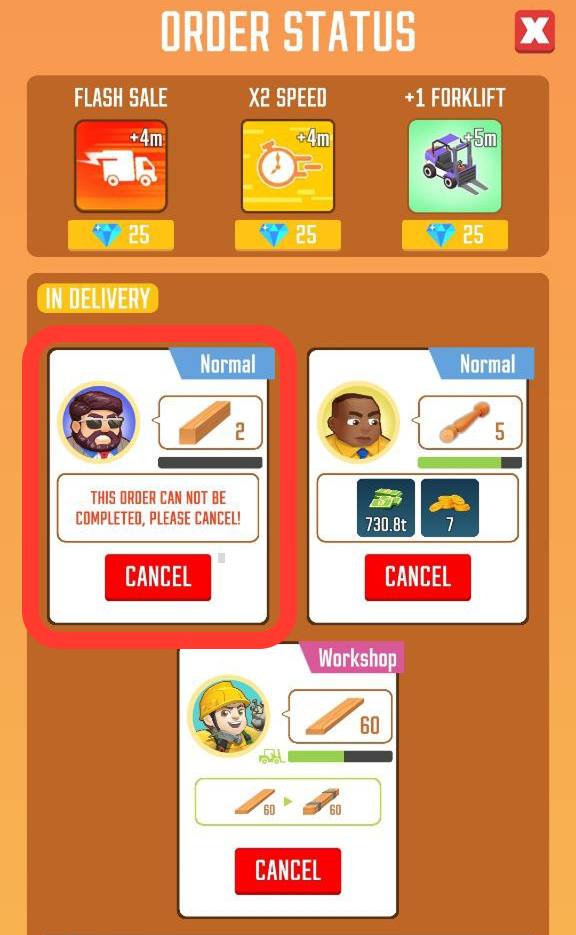
Material Mismatch: For example, you may have accepted an older order that requires cants, but your factory has already upgraded to the next production tier and your warehouse now contains only rough lumber.
System Freeze: Because the warehouse cannot supply the older tier material and your delivery trucks are waiting indefinitely, your logistics team stops moving and nothing happens.
Tips and Strategies
Cancel and Refresh: Do not wait for the order to clear itself. Simply tap on the active contract on your Order Board and select Cancel.
Accept Matching Contracts: Once you cancel the stuck contract, a brief cooldown will trigger, after which you will receive a brand-new order request. Always accept new contracts that match the advanced materials currently sitting in your storage to keep your logistics fleet moving smoothly!