
Feature Overview
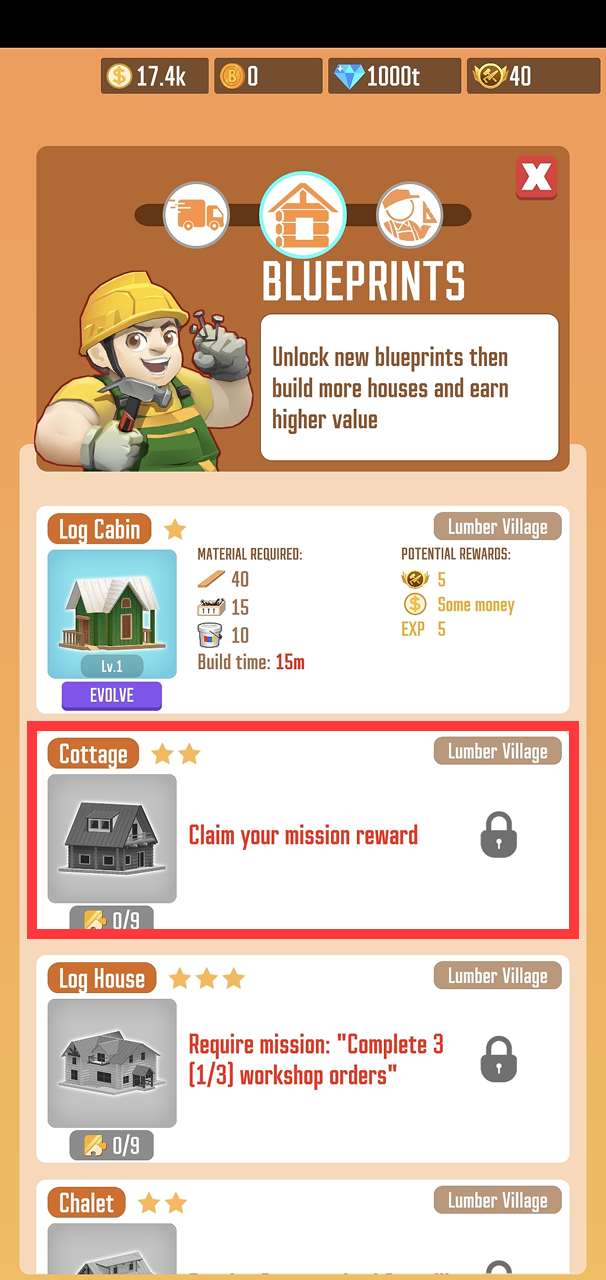
The blueprint catalog inside your factory Workshop acts as the master directory for all your available and upcoming residential housing designs. While navigating this menu, players frequently encounter a specific text prompt next to a locked building that reads "Claim mission rewards" (or displays a mission-tracking icon layout). It is common to mistake this phrasing for an uncollected prize or an active account milestone that is refusing to register your inputs.
However, this tracking line is functioning exactly as intended. It serves as an informative progression gate rather than an active reward link, detailing the exact structural benchmarks required to clear the architectural design for active construction.
How to Access
To view these status trackers, enter your production facility, open the Workshop, and navigate to the Blueprints tab. Scroll past your currently unlocked properties to view the greyed-out cards of advanced models that are still locked. The requirement text is located directly inside the informational description box of each locked house model.
Core Mechanics & Structural Requirements
The presence of this text indicates that the specific housing model is currently undergoing blueprint accumulation. Understanding how to interpret this interface tracker will help you streamline your real estate milestones:
An Informational Requirement Gate: The text block is telling you that the building design is locked behind a blueprint quota. It operates as a status counter, displaying how many layout cards you currently hold versus how many are needed to finalize the engineering scheme.
Automated Unlock Tracking: You do not need to hunt down a specific mission window or tap a separate "Claim" button once the requirements are met. The exact moment your inventory registers the final required puzzle piece, the house design will unlock automatically in your inventory.
Transitioning to the Assembly Line: Once the automatic unlock triggers, the greyed-out overlay will vanish, and the property design will immediately become available as an active build choice on your regular Workshop order board.
Where to Find Blueprint Pieces
To satisfy the requirements shown on your locked cards and push those houses toward an automatic unlock, you must actively source blueprint crates. These assets can be regularly acquired through four primary channels:
The Global Store: Spend your accumulated Village Coins to purchase dedicated Blueprint Chests from the rotating prize market.
The Premium Pass: Clear seasonal tiers and rank up your active battle pass milestones to secure elite asset drops.
Limited-Time Events: Complete objectives and hit point thresholds during competitive weekly challenges.
Sawmill Missions: Keep your primary factory operations running continuously to clear native account contracts and processing assignments.
Tips and Strategies
Ignore the "Claim" Phrasing: Do not waste time tapping on the locked card trying to force a reward payout to trigger. Treat that line purely as a checklist; look at the fraction layout (e.g., 12/25) to see exactly how close you are to activating that specific construction project.
Diversify Your Chest Farming: If you are hit by a bottleneck on a highly desired house model, check your active Sawmill Missions. Pushing your primary factory machines to hit their production quotas is one of the most reliable ways to secure free extra crates without draining your local Village Coin bank.