
While Gold and Goblins does not support automatic cloud synchronization between different platforms (iOS and Android), our Support team can gladly manually transfer your progress to your new device!
What We Need to Complete the Transfer
To move your account, we will need the unique identifiers from both your old and new devices. Please follow these steps:
1. Get Your Old Player ID
Open the game on your old device (where your current progress is saved).
Open the Settings menu (the gear icon in the upper-right corner).
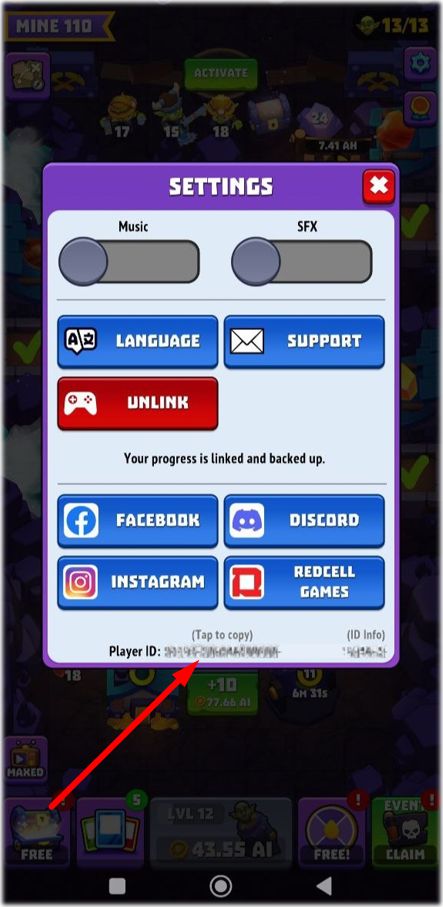
Scroll to the very bottom, below the social media buttons.
Tap the long Player ID number to automatically copy it to your clipboard, then save it somewhere safe.
2. Get Your New Player ID
Open the game on your new device (where you want to move your progress).
Go to Settings and locate the new Player ID at the bottom.
Tap to copy it.
3. Contact Support From Your New Device
In the game on your new device, open Settings and tap the Support button.
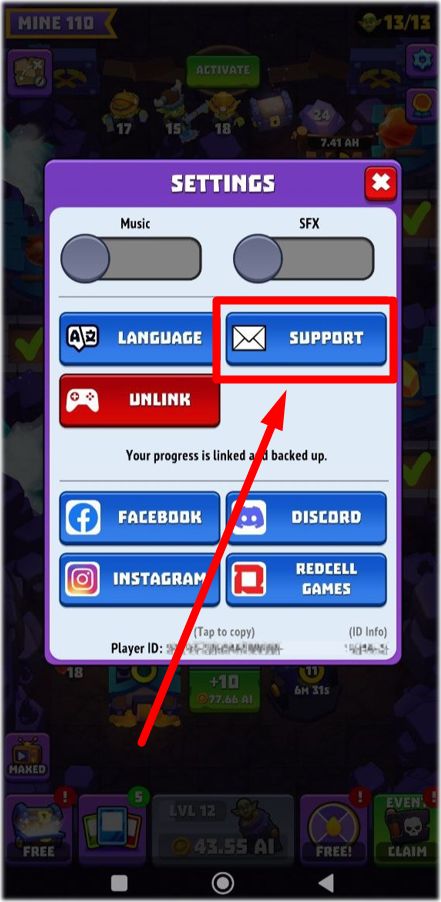
Send us a message with the following details:
Your Old Player ID (the account you want to keep).
Your New Player ID (the account you want to overwrite).
A quick note confirming which device has your main progress.
⚠️ Important Note: A manual transfer completely overwrites any temporary data currently on the destination device. Once our team completes the transfer, your main progress will be safely active on your new device!