
Unfortunately, our game does not support automatic cloud synchronization between different platforms, such as iOS and Android.
This means that linking your account will not transfer your progress when switching from one platform to another.
However, we can manually move your account from one device to another.
What you need to do
1. Open the game on both devices
Please launch the game on your old device (where your progress is saved) and on your new device.
2. Copy your Player ID from the old device
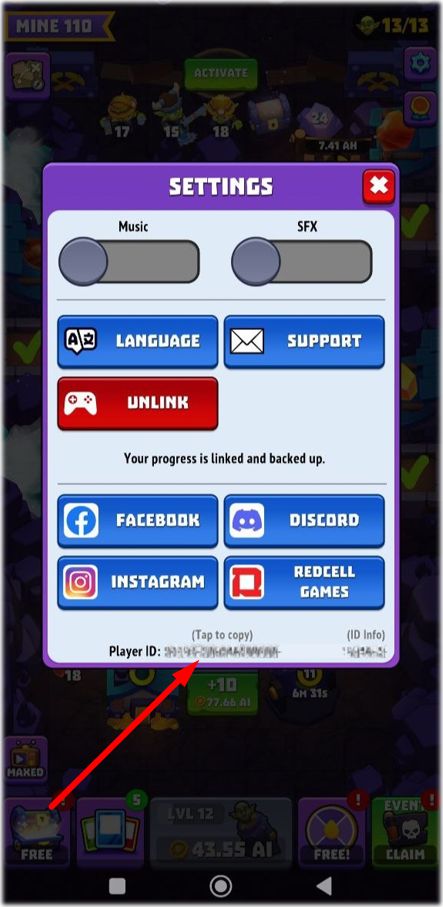
Here’s how to find your Player ID:
Open Settings in the game.
At the bottom of the settings screen, below the social buttons (Facebook, Discord, etc.), you’ll see your Player ID.
Tap the line with your ID - it will be copied automatically.
Paste this ID into your support conversation.
3. Copy your Player ID from the new device
Repeat the same steps to copy the ID from the new device.
4. Contact Support from the new device
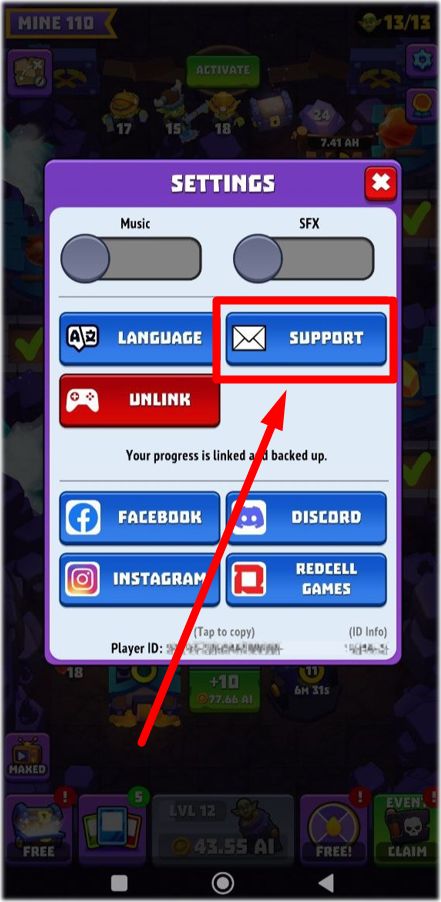
Send us:
The Player ID from your old device
The Player ID from your new device
A short clarification indicating which device contains the progress you want us to transfer
Once we receive this information, we will manually move your account.